
If you've ever felt chained to your social media calendar, you know the drill. You're constantly hunting for content, writing captions, and hitting "publish" at just the right time. But what if you could put all of that on autopilot?
That's exactly what social media automation does. It's a system where you use a platform to schedule content in advance, which then gets published automatically across your channels. It's like having a dedicated social media employee without the high cost, letting you batch-create posts for Instagram and Facebook so your brand stays active even when you're not.
Your New 24/7 Social Media Employee

Picture this: a social media manager who works around the clock, never misses a post, and costs a tiny fraction of a typical salary. That's the power you get when you learn how to automate your social media. It transforms your social presence from a daily grind into a self-sustaining asset that works for you, even while you sleep.
By setting up an automated workflow, you’re basically creating an "always-on" digital employee. This isn’t about faking authenticity—it’s about handing off the repetitive, mechanical tasks. That frees you up for the human stuff that actually matters, like engaging with your followers and building real relationships.
The True Cost of Manual Posting
It’s easy to underestimate just how much time and energy manual posting really consumes. The constant pressure to find, create, and share content every single day leads straight to burnout and, worse, wildly inconsistent results. You end up stuck in a reactive cycle, always scrambling for the next post instead of focusing on the big picture.
Automated systems, especially a platform like Stacksite.io, completely flip that script.
They give you the structure to:
- Get your time back. No more daily scramble. You can create and schedule weeks or even months of content in one sitting.
- Stay perfectly consistent. Your accounts remain active and visible, posting at the best times, without you lifting a finger.
- Slash your operational costs. You get all the benefits of a dedicated social media employee without the high cost.
It's more than just a convenience. It's a fundamental shift in how you run your brand online, turning a constant time-suck into a predictable engine for growth.
Think about the difference in a head-to-head comparison.
Manual Posting vs Automated Workflows
| Aspect | Manual Posting | Automated with Stacksite.io |
|---|---|---|
| Time Investment | Daily, time-intensive task | Set it up once, then minimal upkeep |
| Consistency | Prone to gaps and missed posts | Flawless, around-the-clock posting |
| Peak-Time Posting | Requires you to be online at specific times | Automatically posts when your audience is active |
| Cost | High (your time or an employee's salary) | Low monthly subscription |
| Strategic Focus | Reactive, focused on the next post | Proactive, focused on long-term goals |
The table makes it pretty clear. Automation doesn't just save time; it creates a more reliable and strategic foundation for your entire social media presence.
A Strategy for Everyone
And this isn't some secret weapon reserved for huge corporations with massive marketing departments. The social media automation market is already worth USD 4.5 billion and climbing fast, because businesses of all sizes are seeing the light. You can find more data on social media automation statistics over on templated.io.
Tools like Stacksite.io make this approach accessible to everyone, from solo freelancers to small business owners. By automating the foundational work, you build a dependable system that ensures your brand always shows up. And that lets you get back to what you do best—running your business.
Building Your Automated Content Engine
Good automation isn't about just scheduling random posts here and there. It’s built on top of a smart, repeatable content strategy. Think of it less like a daily chore and more like building a well-oiled machine.
Instead of waking up every morning scrambling for ideas, you’ll be feeding a system with high-quality content that it deploys for you. This is exactly how you get your time back and finally get ahead of the social media game.
The real secret is to stop thinking post-by-post and start thinking in batches. With a solid framework, you can genuinely knock out a month's worth of engaging social media content in a single afternoon. This shift turns social media from a reactive, stressful task into something proactive and strategic.
From Daily Scramble to Content Powerhouse
Your first move is to lock down your content pillars. These are the 3-5 core themes or topics your brand will own and talk about consistently.
Let's say you run a local coffee shop. Your pillars might look something like this:
- Behind-the-Scenes: Showcasing the coffee roasting process, your baristas practicing latte art, or staff spotlights.
- Community Highlights: Featuring local events you're part of, partnerships with other neighborhood businesses, or sharing customer photos.
- Product Spotlights: Highlighting a specific menu item like a seasonal latte, a new single-origin bean, or running a flash promotion.
- Educational Tips: Sharing home-brewing tips, the origin story of a particular coffee, or the flavor notes of different roasts.
Once you have your pillars, batch creation becomes almost effortless. You stop asking, "What should I post today?" and start asking, "What's one 'Behind-the-Scenes' post I can create this week?". This focus makes generating content so much faster and keeps your brand message tight.
With pillars defined, you can create versatile post templates for each one. A template isn't a rigid script; it's a flexible starting point. For the coffee shop's "Educational Tips" pillar, you could design templates for a quick tip graphic, a short video tutorial, or a simple Q&A post. No more staring at a blank screen.
If you want to dive deeper into structuring these ideas, our guide on strategic content creation gives you frameworks you can put to use right away.
Centralize Everything in a Content Library
The final piece of your content engine is a central library. This is where all your approved posts, images, videos, and templates live, ready for your automation tool to pull from.
A platform like Stacksite.io is designed for this exact purpose, acting as a command center for your entire social media operation.
This screenshot shows how a centralized platform like Stacksite.io brings all your assets and scheduling into one clean interface.
Having a single source of truth like this kills confusion and makes it dead simple to see what content is ready to go.
By building this content engine—pillars, batching, templates, and a central library—you're essentially creating a dedicated social media employee that works 24/7 without the high cost. You feed it the strategy, and it handles the execution flawlessly.
This system is the bedrock for learning how to automate social media posts the right way. It ensures your automated workflow is always supplied with high-quality, on-brand content, turning your social channels into a predictable and powerful asset. You finally stop chasing the algorithm and start building a system that works for you.
Setting Up Your First Automated Workflow
Alright, you've built the content engine. Now it's time to turn it on.
This is where the planning pays off and you finally get to see your automated system come to life. Think of it as hiring a new digital employee whose only job is to post your best stuff at the right time. We’ll walk through exactly how to set this up using a platform like Stacksite as our guide.
Don't worry, this isn't about getting tangled up in code or technical jargon. The whole point is to connect your accounts, dump in your content, and tell your new "employee" what to do.
Getting Your Accounts Connected and Content Loaded
First things first: you have to give the platform the keys. This means linking your social media profiles—like Facebook, Instagram, and LinkedIn—to Stacksite. It’s a simple authorization process where you grant permission for it to post on your behalf. You only have to do it once, and it creates that essential bridge between your content library and your live accounts.
Once you're connected, it's time to stock the shelves. You'll upload all that content you batched earlier—your images, videos, and captions—into a central library. This step ensures your system has a steady supply of high-quality, on-brand material ready to go at a moment's notice.
This whole process really flows from your core content pillars, through batching, and into the library.
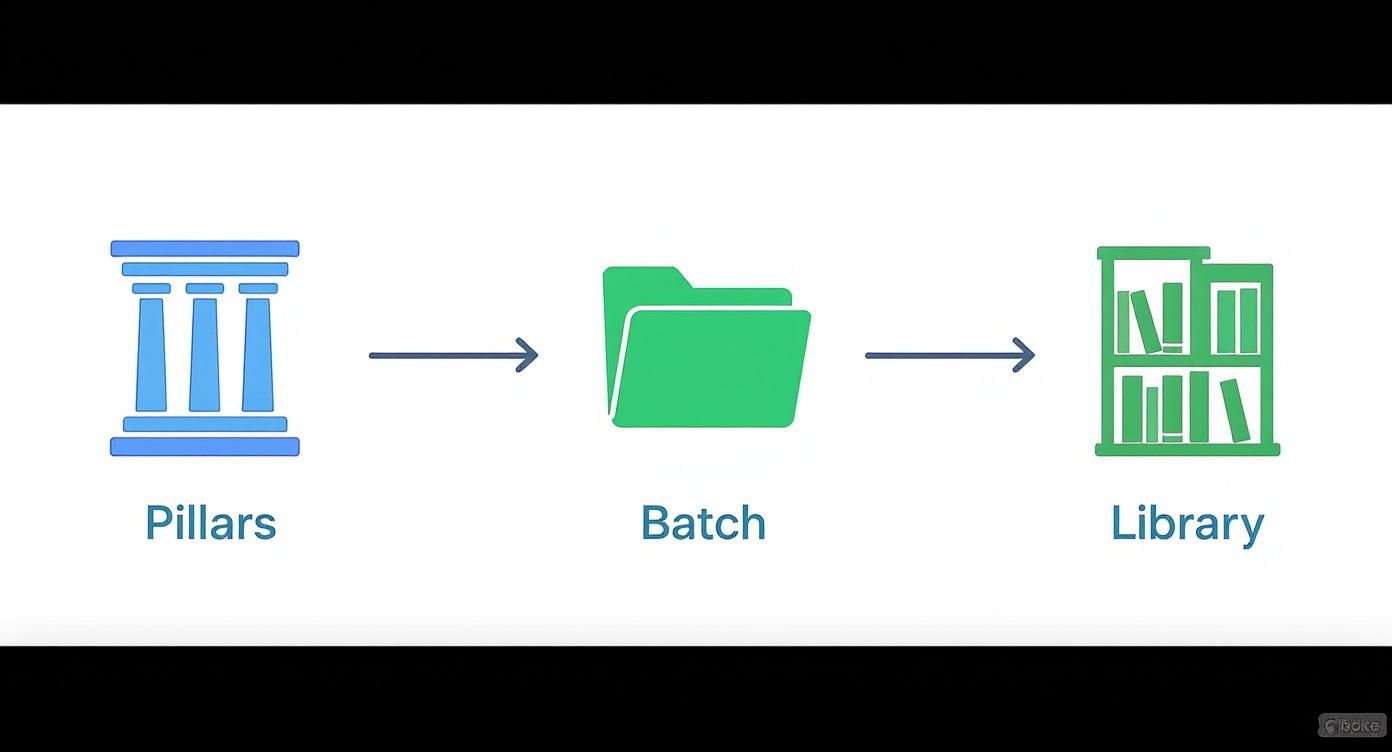
As you can see, a great workflow starts with organizing your content strategically. Nail that, and the scheduling part becomes dead simple.
Defining Your Posting Schedule (The "Set It and Forget It" Part)
With your accounts linked and your library full, you can now build your posting schedule. Instead of painstakingly picking a date and time for every single post, you just create a recurring weekly calendar.
Maybe you decide to post once every weekday morning and once in the evening. That's it. You're basically telling Stacksite, "Here's all my content and here are the time slots. You figure it out." The platform then dips into your library and publishes posts according to the schedule you’ve set.
The real magic here is how scalable this is. A schedule that takes a few minutes to create can keep your social media humming along for weeks or even months. You get to maintain a consistent presence without the daily grind. It's the foundation of a true "set it and forget it" system.
Let AI Handle Peak Time Engagement
A basic schedule is good. A smart schedule is a game-changer.
This is where you get the perks of a dedicated social media manager without the price tag. One of the best features in a platform like Stacksite is AI-powered peak time posting. Instead of just guessing when your audience is scrolling, you can let the algorithm do the heavy lifting for you.
Just toggle the feature on. The system immediately starts analyzing your audience's engagement patterns and automatically tweaks your posting times to hit those moments when your followers are most likely to see, like, and comment. It's a tiny adjustment that can give you a massive boost in reach and interaction—all without you having to stare at analytics reports. The system just learns and adapts on its own.
If you want to get into the nitty-gritty, you can dig into the specifics of how the Stacksite auto-posting feature works to optimize your schedule.
Ready to go live? Here’s a quick checklist for two common campaigns:
The Evergreen Content Loop:
- Make a content category called "Evergreen."
- Upload 15-20 of your absolute best, non-time-sensitive posts.
- Set a schedule to post from this pile 3 times per week.
- Flip on the peak time posting option to get more eyes on it.
The Promotional Push:
- Create a separate category for your next launch or sale.
- Add 5-7 promotional posts with super clear calls-to-action.
- Schedule these to go out daily for the week leading up to your event.
- Set an expiration date so they automatically stop publishing once the promo is over.
Follow these simple recipes, and you can have an intelligent automation up and running in less than an hour. It’ll take over the daily posting grind and start turning your social media into a reliable, hard-working marketing channel.
Mastering Evergreen Content and Smart Recycling

Why let your absolute best content just disappear into the social media void after one share? This is where true automation shows its power, turning your social strategy from a one-and-done effort into a real, long-term engagement engine. The whole game changes when you get smart about content recycling.
Instead of being stuck on the content creation treadmill, you can identify your top-performing posts—the ones that already drove the most clicks, comments, and shares—and give them a second, third, or even fourth life. This isn't just about saving a few hours. It’s about squeezing every last drop of value out of assets you've already proven work.
Think of it like having a dedicated social media employee whose only job is to make sure your most valuable insights are always circulating, reaching new people who missed them the first time around.
Building Your Evergreen Library
The entire foundation of smart recycling rests on your evergreen content library. This is just a curated collection of your most timeless, valuable posts—the stuff that isn't tied to a specific date or event. We're talking helpful tips, foundational advice, glowing customer testimonials, or cool behind-the-scenes stories.
Your first move is to pinpoint these high-performers. Dive into your analytics and find the posts with standout engagement rates. These are your proven winners, the content your audience literally voted for with their attention. Once you have a list, you can build them into a dedicated "Evergreen" category inside a platform like Stacksite.io.
By creating an evergreen category, you’re no longer just scheduling posts. You’re building a self-sustaining asset that works for you indefinitely, ensuring your brand’s best messages are always in front of your audience with minimal ongoing effort.
Keeping Recycled Content Fresh
Of course, just reposting the exact same thing over and over can get stale fast. The trick is to introduce small variations to keep it feeling new, which is surprisingly simple to automate.
For a single high-performing post, you can create a few different versions to cycle through:
- Vary the visuals: Use the same caption but pair it with a new image, a short video clip, or a simple infographic.
- Tweak the hook: Just rewrite the first sentence of the caption to grab attention in a different way.
- Change the call-to-action: Ask a different question, or point users to a different link this time.
By creating these simple variations, you can set up an automated loop that feels dynamic and fresh to your audience, not repetitive.
Setting the Rules in Stacksite
Inside a tool like Stacksite.io, you can take this a step further by setting specific rules for your evergreen categories. For instance, you can tell the platform to pull a post from your evergreen library, say, twice a week, and then ensure the exact same post isn't repeated within a 60-day window.
This level of control is what makes automation so powerful. It acts as your strategic partner, intelligently managing your content rotation to avoid audience fatigue while guaranteeing a consistent flow of high-value posts. This is how you automate social media posts in a way that truly compounds your reach—without the high cost of a full-time employee.
Measuring Success and Optimizing Your Automation

Automating your social media isn't just about saving time—it’s about getting better results with less effort. A "set-it-and-forget-it" mindset only really works if you periodically check in to see what's actually effective.
This is how your automated system evolves from a simple scheduler into a smart, data-driven marketing employee. Instead of just guessing, you can use the built-in analytics inside a platform like Stacksite to make informed decisions and really understand what your audience wants to see.
Key Metrics to Monitor
To get better, you first need to know what to measure. It's easy to get lost in a sea of data, so I always recommend focusing on the metrics that directly show audience interest and action.
These are the big three to watch:
- Engagement Rate: This is your most important health check. It combines likes, comments, and shares to show you how many people are actively interacting with your content, not just scrolling past it.
- Click-Through Rate (CTR): When you share links, this tells you what percentage of viewers actually clicked. A high CTR means your calls-to-action and content are genuinely compelling.
- Reach and Impressions: Reach is the number of unique people who see your post, while impressions are the total number of times it was seen. Tracking these helps you understand your content's overall visibility.
These numbers tell a story. A post with sky-high reach but low engagement might have a weak hook. On the other hand, one with a killer engagement rate is a perfect candidate for your evergreen recycling loop.
Think of your analytics dashboard as a performance review for your automated "employee." It's where you identify your star performers and find opportunities for improvement, ensuring your system gets smarter over time.
A Framework for Continuous Improvement
Data is useless without action. The real magic happens when you use these insights to systematically improve your automated workflow. This is where you can A/B test different elements to see what truly resonates.
For instance, you can schedule two similar posts but swap out the headline or image to see which one performs better. Platforms like Stacksite make this dead simple by letting you create content variations right in your library. Just remember to test one variable at a time—like the image, the caption's first line, or the posting time—to get clean results.
To make this a habit, I suggest a simple monthly automation audit. It only takes an hour and keeps your entire system sharp.
Here’s your checklist:
- Identify Top Performers: Find your top 5 posts from the last month based on engagement. Add them straight to your evergreen library.
- Prune Underperformers: Find your bottom 5 posts. Archive them so they don't get recycled again. Simple.
- Review Posting Times: Check if engagement spikes on certain days or at specific times. Tweak your automated schedule accordingly.
This quick audit turns your automation into a learning machine. You'll constantly be doubling down on what works and cutting what doesn't. It's how you make sure your social media presence isn't just consistent, but consistently improving.
Common Questions About Social Media Automation
Jumping into social media automation for the first time usually brings up a few questions. It’s a big change from posting everything by hand, so it makes sense to wonder about authenticity, how much work it really is, and which platforms it’s even good for. Let’s tackle some of the common concerns.
The best way to think about automation isn't as a replacement for you, but as a tool that handles all the repetitive grunt work. It’s like having a dedicated social media employee without the high cost, freeing you up to focus on the stuff that actually grows your brand.
Will Automating Posts Make My Brand Sound Robotic?
This is easily the biggest fear, but it comes from a misunderstanding of what we’re actually automating. You’re automating the publishing, not the personality. All the authenticity and brand voice comes from the content you create ahead of time.
A platform like Stacksite.io is your tireless scheduler, not your ghostwriter. It takes the genuinely on-brand content you’ve already crafted and just posts it at the most effective times. Think of it as a dedicated social media employee who never sleeps or misses a deadline, making sure your real message gets out there consistently.
The goal is to use automation for consistency, not to replace authenticity. Your saved time should be reinvested into real-time engagement with comments and messages—that’s where genuine interaction truly happens.
How Much Content Do I Need to Get Started?
You definitely don't need a six-month content library sitting there on day one. A fantastic starting point is just 15-20 solid, evergreen posts. That’s totally doable in a single afternoon and gives you more than enough fuel to fill your schedule for weeks.
The idea is to start small and build momentum. Once you’ve got those first posts running on autopilot, you can set aside a couple of hours each month to add more to the library. It becomes a small, regular task for your "digital employee," not a daily scramble. Over time, that small investment compounds into a massive asset.
Is Social Media Automation Suitable for All Platforms?
Automation really shines on platforms designed for broadcasting scheduled content. It’s most powerful on channels like:
- Facebook Pages
- Instagram Feeds
- LinkedIn Profiles and Pages
- X (formerly Twitter)
For these places, a tool like Stacksite.io is the perfect employee, handling the steady drumbeat of your core content.
On the other hand, formats that are all about spontaneous, in-the-moment interaction—like Instagram Stories or live videos—are still best done manually. A smart strategy uses automation to cover the foundational, scheduled posts, which frees you up to personally engage with these more dynamic formats when it counts.
Ready to hire your new 24/7 social media employee? With Stack Site, Inc., you can automate your posting schedule, recycle your best content, and reclaim your time—all without the high cost of an agency. Start building your social media engine today.